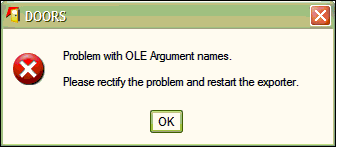
Hi,
I have a problem when I try to export DOORS (8.3) change proposals (basically the contents of the attributes 'proposed Object Text', 'cp-status',etc.) to MS Word 2007 using WEXP. This export worked fine for Word 2003.
What I get now is this message: "Problem with OLE Argument names....rectify and restart exporter".
I have no idea what I can do to solve this. First I thought it is related to OLE objects embedded in an attribute, but it isn't. Even plain text causes this message.
Exporting a formal (requirement) module works.
Has anyone seen this problem? Is this related to Word 2007? Any help appreciated very much.
Thanks
Harald
DEHKB - Tue Oct 25 05:19:15 EDT 2011 |
|
Re: WEXP export to MS Word 2007
ChrisAnnal - Tue Oct 25 08:27:41 EDT 2011
It may be that the document you are trying to export is the problem. Some older documents (and those that people used as a "template" for a new document, which happens a lot) may cause a "Word cannot start the converter..." message. I attached a brief document that shows how I managed to correct this issue. I hope it works for you.
Chris Annal
DOORS Database Administrator / SW Test Engineer
Saab Sensis Corporation,
East Syracuse, New York
chrisa@saabsensis.com
Attachments
attachment_14696889_DOORS_Export_to_Word_-_Missing_Converte.docx
|
|
Re: WEXP export to MS Word 2007
ChrisAnnal - Tue Oct 25 08:30:27 EDT 2011 ChrisAnnal - Tue Oct 25 08:27:41 EDT 2011
It may be that the document you are trying to export is the problem. Some older documents (and those that people used as a "template" for a new document, which happens a lot) may cause a "Word cannot start the converter..." message. I attached a brief document that shows how I managed to correct this issue. I hope it works for you.
Chris Annal
DOORS Database Administrator / SW Test Engineer
Saab Sensis Corporation,
East Syracuse, New York
chrisa@saabsensis.com
Chris Annal
DOORS Database Administrator / SW Test Engineer
Saab Sensis Corporation, East Syracuse, New York
chrisa@saabsensis.com
|
|
Re: WEXP export to MS Word 2007
DEHKB - Tue Oct 25 09:27:23 EDT 2011
Chris,
thanks for your reply. No, the converter seems not to be the problem. All templates (.dot) that we use are relatively new (Word 2003).
I have attached the message that I get. Have you seen sth like this
Thanks
Harald
|
|
Re: WEXP export to MS Word 2007
DEHKB - Tue Oct 25 09:31:11 EDT 2011
...trying to get the attachment here....
Attachments
attachment_14696912_OLE_Argument.bmp
|
|
Re: WEXP export to MS Word 2007
ChrisAnnal - Tue Oct 25 11:08:27 EDT 2011 DEHKB - Tue Oct 25 09:31:11 EDT 2011
...trying to get the attachment here....
Chris Annal
DOORS Database Administrator / SW Test Engineer
Saab Sensis Corporation, East Syracuse, New York
chrisa@saabsensis.com
|
|
Re: WEXP export to MS Word 2007
Mathias Mamsch - Wed Oct 26 16:42:27 EDT 2011 DEHKB - Tue Oct 25 09:31:11 EDT 2011
...trying to get the attachment here....
Then you can see if this is a WEXP issue, or a custom one. From my guess "Invalid Argument Names" is almost always a programming bug, so DXL tried to access a COM function with the wrong parameters. Do you maybe have customized your WEXP in some way where you do OLE access(look at usercallouts.inc)? That would explain, why you are getting an error, that does not occur for other people. Regards, Mathias
Regards, Mathias
Mathias Mamsch, IT-QBase GmbH, Consultant for Requirement Engineering and D00RS
|
|
Re: WEXP export to MS Word 2007
DEHKB - Fri Oct 28 11:47:47 EDT 2011 Mathias Mamsch - Wed Oct 26 16:42:27 EDT 2011
We have been using WEXP for quite some time, without any issues with Word 2007. Are you actually using the Trek /RMF Wexp or the 'free' one. To narrow down the reason you would need to put a "dxlHere" in the ole functions file, where the error is raised, and see in which file at what part of the code the error is produced.
Then you can see if this is a WEXP issue, or a custom one. From my guess "Invalid Argument Names" is almost always a programming bug, so DXL tried to access a COM function with the wrong parameters. Do you maybe have customized your WEXP in some way where you do OLE access(look at usercallouts.inc)? That would explain, why you are getting an error, that does not occur for other people. Regards, Mathias
Regards, Mathias
Mathias Mamsch, IT-QBase GmbH, Consultant for Requirement Engineering and D00RS
thanks for the reply. For historic reasons we are using the 'free' WEXP. Still we had no trouble with it until now. What I really do not understand is, why there is a difference between exporting any formal module and a change proposal module.
I will check if there are any usercallouts. Not sure what to do with a 'dxlHere'.
Regards
Harald
|
|
Re: WEXP export to MS Word 2007
SystemAdmin - Mon Oct 31 11:00:28 EDT 2011 DEHKB - Fri Oct 28 11:47:47 EDT 2011
Mathias,
thanks for the reply. For historic reasons we are using the 'free' WEXP. Still we had no trouble with it until now. What I really do not understand is, why there is a difference between exporting any formal module and a change proposal module.
I will check if there are any usercallouts. Not sure what to do with a 'dxlHere'.
Regards
Harald
One slight draw back is that if there is more than one OLE in an object then only the first OLE will be identifed. This is not a big problem but you need to know about it.
This is not a great solution but it helped me get past this annoying problem and move on to the next thing.
Good Luck - I hope this helps
RobK
_________________________
Buffer b = create()
b = richTextWithOle (obj."Object Text")
string reHeader = "{\\\\object\\\\objemb{\\\\\\*\\\\objclass (^}+)}"
string picHeader = "{\\\\pict\\\\([^\\\]+)"
Regexp reOle = regexp reHeader
Regexp rePic = regexp picHeader
Regexp reOlePicFind = regexp "{\\\\(object|pict)"
// Determine the right regular expression to use ...
reOlePicFind b
// display "Looking in Buffer:" (tempStringOf b) "\n"
string type = bmatch 1
if (type == "pict") expr = rePic else expr = reOle
if (expr b) {
val = b match 1
display "Class: " val "\n"
} else {
display "No OLE found!"
}
|
|